一、回顾——方法的定义和调用
使用定义方法的方式在控制台来打印矩形。
public class Method_Demo01{
    public static void main(String[] args){
        print();
    }

    private static void print(){
        for(int i = 0; i < 5; i++){
            for(int j = 0; j < 8; j++){
                System.out.print("*");
            }
            System.out.println();
        }
    }
}
在该代码中,控制台打印出矩形就可以了,因此将方法定义为void,没有返回值。print方法被main方法调用后直接输出结果,而main方法并不需要print方法的执行结果,所以被定义为void。
二、定义方法的格式详解
修饰符 返回值类型 方法名(参数列表){
    // 代码省略...
    return 结果;
}
- 修饰符:public static 固定写法
- 返回值类型: 表示方法运行的结果的数据类型,方法执行后将结果返回到调用者
- 参数列表:方法在运算过程中的未知数据,调用者调用方法时传递
- return:将方法执行后的结果带给调用者,方法执行到
return,整体方法运行结束
小贴士:return结果:这里的“结果”在开发中,我们正确的叫法称为方法的返回值
三、定义方法的两个明确
- 需求:定义方法实现两个整数的求和计算
- 明确返回值类型:方法计算的是整数的求和,结果必然是整数,返回值类型定义为
int类型 - 明确参数列表:计算哪两个整数的和,并不清楚,但可以确定是整数,参数列表可以定义两个
int类型的变量,由调用者调用方法时传递
- 明确返回值类型:方法计算的是整数的求和,结果必然是整数,返回值类型定义为
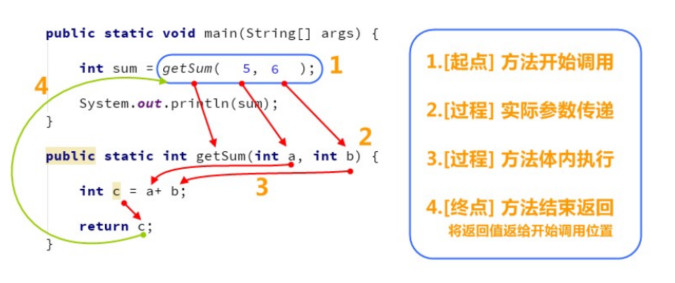
四、调用方法的流程图解
五、定义方法的注意事项
- 定义位置,类中方法外面
- 返回值类型,必须要和
return语句返回的类型相同,否则编译失败 - 不能在
return后面写代码,return意味着方法结束,所有后面的代码永远不会执行,属于无效代码
六、方法重载
- 方法重载:指在同一个类中,允许存在一个以上的同名方法,只要它们的参数列表不同即可,与修饰符和返回值类型无关
- 参数列表:个数不同,数据类型不同,顺序不同
- 重载方法调用:JVM通过方法的参数列表,调用不同的方法
七、方法重载练习
1、练习
比较两个数据是否相等,参数类型分别是两个byte类型,两个short类型,两个int类型,两个long类型,并在main方法中进行测试。
package cn.wolfwotz.day01.Demo04;

public class Method_Demo {
    public static void main(String[] args) {
        // 定义不同数控类型的变量
        byte a = 10;
        byte b = 20;
        short c = 10;
        short d = 20;
        int e = 10;
        int f = 10;
        long g = 10;
        long h = 20;

        // 调用
        System.out.println(compare(a, b));
        System.out.println(compare(c, d));
        System.out.println(compare(e, f));
        System.out.println(compare(g, h));
    }

    public static boolean compare(byte a, byte b){
        System.out.println("byte");
        return a == b;
    }

    public static boolean compare(short a, short b){
        System.out.println("short");
        return a == b;
    }

    public static boolean compare(int a, int b){
        System.out.println("int");
        return a == b;
    }

    public static boolean compare(long a, long b){
        System.out.println("long");
        return a == b;
    }
}